Data availabilityTopic and queue available; outcome label missing2 of 3 fields
Process ownerSupport lead confirms the routing rulesOwner identified
Sample accessConfirm permission before using ticket recordsOn hold
Deliver a readiness sheet with data sources, gaps, access and a named owner for each gap.
See the test for ai readiness assessment
Target: confirm access and all three fields before testing.
AI strategy
Option comparison
Routing rulesUse a selected topic to assign the ticketTest first
AI classifierInfer a topic from free textHold for labeled examples
DecisionTrial rules on the same sample before adding AISupport lead owns the decision
Deliver a short decision record with the options, evidence needed and the order of work.
See the test for ai strategy
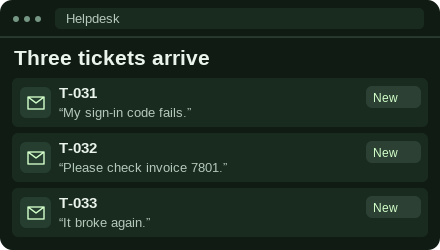
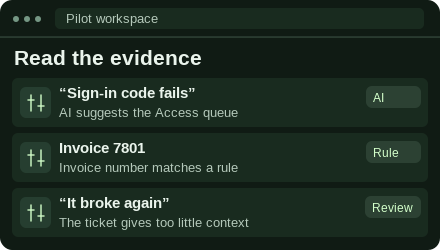
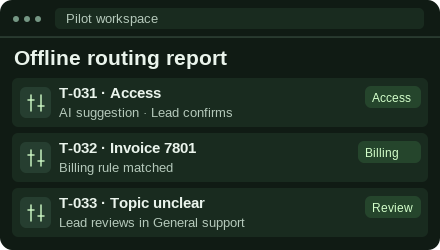
Test both options against the same sample. Compare correct routes and exceptions for staff review.
Pilot planning
Pilot scorecard
Test set50 fictional helpdesk ticketsOffline trial
Acceptance criterionAt least 45 of 50 correct routesTarget
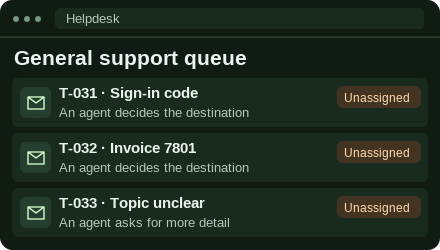
Missing topicSend every missing-topic ticket to General supportRequired check
Deliver a test plan with a sample, a scorecard and a decision owner. Keep live routing outside the trial.
See the test for pilot planning
Continue only if the pilot meets both checks. Otherwise review the failed routes.
Ways to work with us
We offer project-based, full-time, part-time and hourly options. We confirm what fits the scope of your work and our team’s availability.
One conversation
Tell us where the work gets stuck.
One example, the tools involved and what you want to change are enough to start. Keep customer records and other confidential details out of the first message.
Delivery, cost factors, ownership, support and FAQs.
Scope & deliverables
What you get from an assessment.
We use a readiness assessment to answer a practical question: what can your team change with the tools, information and time you have?
01 / Understand
A map of the work
See what starts the process, who handles it, where it slows down and what the existing tools can already do. We note missing data or access before suggesting a change.
02 / Compare
An honest comparison
Compare fixing the process, using a built-in feature, connecting tools or adding AI. See why each option is in or out, what it depends on and what could go wrong.
03 / Decide
A plan you can act on
Take away a written recommendation with the first milestone, who needs to be involved, what to check and what can wait. Your team can use the plan even if we don’t build it.
How we work
How we get to a decision.
Start with one process. Get enough evidence to decide whether to fix it, test a small change or leave it alone for now.
Walk through a real example with the people doing it. Note which steps repeat and which depend on judgement.
02
Compare the options
Check the data, permissions and ways to connect your tools. Use what you learn to rule out options that won’t work.
03
Agree what comes first
We talk through the written plan together. Agree one useful milestone and what evidence would make it worth proceeding.
What shapes the cost?
The people we need to speak to, the tools involved, the evidence you have and what we need to check. We agree the assessment scope, price and timing first. Building a pilot, tool licences and ongoing support are separate decisions.
What an assessment covers, what to bring and what happens next.
Do we need to use AI?
No. If a rule, a change to the process or a feature in a tool you already use solves the problem, we recommend that first. AI needs to earn its place.
How is this different from workflow automation?
Consulting helps you decide what to change and why. Workflow automation is the work of building and testing a specific flow once you know what it should do. Explore workflow automation services
What should we bring to the first conversation?
A short example of the work, where it gets stuck and the tools involved is enough to start. Leave out passwords, customer records and anything confidential.
Can we keep our current tools?
We look at the tools you already have first. If a connection is needed, we check what access and data they can provide before recommending a replacement or a new tool.
How much does an assessment cost, and how long does it take?
It depends on the process, the people and systems involved, and what we need to verify. We agree the scope, price and timing before work starts. Implementation, licences and support are separate.
Can our team use the plan without hiring you to build it?
Yes. Take the plan to your own team or ask us to scope a build. You keep control of your data and own the bespoke work we develop for you. We document access, handover and third-party licences separately.
Who looks after a system if you build it?
We agree who is responsible before launch, what they review and how issues or changes are handled. The review frequency, fixes, improvements and capacity are scoped, not unlimited.
Engineering & operations
People behind the plan.
The process has to work for the team that uses it, and the system has to hold up when things go wrong. We confirm who is involved and what they will cover before the work starts.
Miguel Ángel Rasero
AI & software engineering
Looks at the systems, data access and integrations, and what your team would need to build and test.
Miriam Alonso
Automation & process improvement
Looks at who does the work, where it gets stuck and what a useful change would look like for the people doing it.
See what we might recommend for a sales handoff, a support team or an unreliable report. These examples use made-up situations, not client evidence.
Sales enquiriesTwo teams enter the same lead
What we see
A web form and a shared inbox both feed sales. Staff copy the details and sometimes give the same enquiry to two people.
What we’d recommend
Check the CRM for the same email before making a new contact. Use one routing rule for the owner. No AI is needed.
What we’d check
Replay a duplicate and try two people with the same name. The duplicate keeps one owner; different emails stay separate.
Customer supportSupport staff look for answers in several places
What we see
The team searches multiple guides when a question comes in. Some are old and not every document can be shared with every person.
What we’d recommend
Agree which guides count first. If search still slows the team down, test an assistant that drafts from approved sources and lets staff check the answer.
What we’d check
Give it a known question, a missing answer and a restricted document. Check the cited source and what the assistant does when it should not answer.
ReportingThe same number changes from one report to another
What we see
Two spreadsheets use different definitions for the same metric. Nobody can reliably explain which is right.
What we’d recommend
Don’t automate it yet. Agree the definition and its owner, then check that both teams can recreate the number from the same source.
What we’d check
Use one reporting period and compare the inputs and exclusions. Only decide on a connection once the numbers can be reconciled.