Corporate AI Training
Give your staff a safe place to practise using AI. Learn what to share, how to check a draft and when to ask for help.
The form prepares an email you can review and send.
Where we can help
- Practise a task your staff do at work with fictional data.
- Check each claim in an AI draft against an approved source.
- Take away an exercise, a review checklist and a guide for team leads.
See an example
A staff member checks an AI draft against a practice policy. When a sample file is flagged as restricted, the staff member switches to approved synthetic data.
Illustrative demo: verify a draft before sharing it
Recreated screens. Fictional data.
Read the screen details
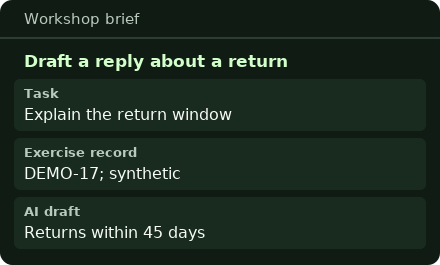
1. What comes in: Draft a reply about a return
Workshop brief
- Task
- Explain the return window
- Exercise record
- DEMO-17; synthetic
- AI draft
- Returns within 45 days
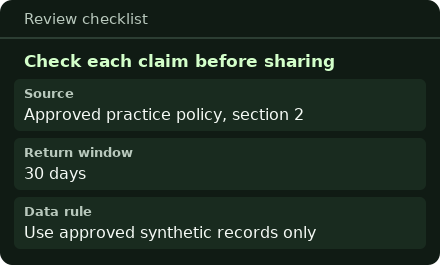
2. What the system checks: Check each claim before sharing
Review checklist
- Source
- Approved practice policy, section 2
- Return window
- 30 days
- Data rule
- Use approved synthetic records only
Without the solution: The draft has an unchecked claim
Practice draft
- Return window in draft
- 45 days
- Source check
- Pending
- Draft status
- Needs review
With the solution: The staff member verifies and fixes the draft
Practice draft
- Return window in draft
- 30 days
- Evidence
- Practice policy, section 2
- Draft status
- Checked in the workshop
Without the solution: A sample file is flagged as restricted
Workshop inbox
- Attachment
- DEMO-18; synthetic simulation
- Practice label
- Restricted customer file
- Tool input
- Awaiting a safe record
With the solution: The staff member uses the approved sample
Workshop review
- Restricted sample
- Kept out of the AI tool
- Tool input
- DEMO-19; approved synthetic record
- Instructor check
- Safe input and source confirmed
3. See the result in the tool
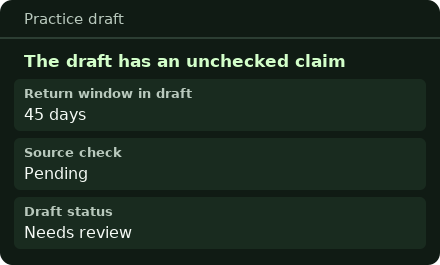
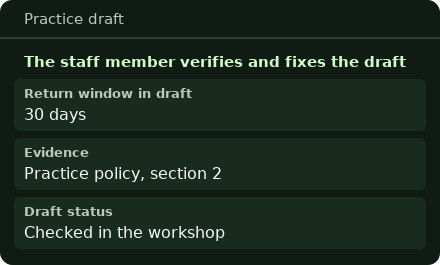
The staff member checks the draft against the practice policy and changes the return window from 45 to 30 days. The draft stays in the workshop.
Exception: a sample attachment carries a restricted label
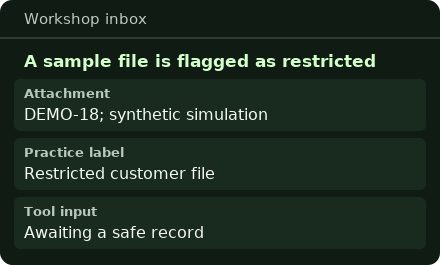
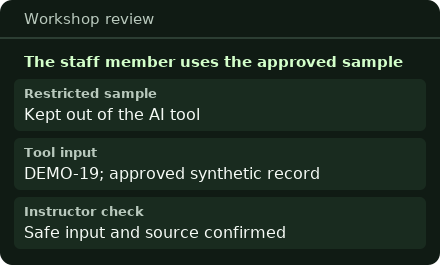
The staff member leaves the flagged sample out of the tool and uses an approved synthetic record. The instructor checks the choice and the cited policy.
Tell us about one job you need to get right
Start with your name and email. Review the draft before you send it.
Email us directlyProject details
Delivery, cost factors, ownership, support and FAQs.
What you get
Practise a task from your work
An instructor adapts a workshop to a task your staff do, such as drafting a support reply. The exercise uses approved synthetic records.
Check what AI writes
Staff compare each claim with an approved source. They fix errors, flag missing evidence and decide if a draft is ready to share.
Give team leads a practice kit
The kit includes the exercise, an answer key and a checklist for reviewing drafts and handling restricted data.
How we deliver and test it
Agree the audience and the task
We confirm the instructor, staff roles, permitted tools and exercise rules before scheduling the workshop.
Run the workshop
The instructor asks participants to find an unsupported claim and handle a simulated restricted file. Each participant shows which source supports the final draft.
Review the exercise with team leads
We discuss where staff needed help and give team leads the practice kit. Team leads choose who maintains the checklist.
What shapes the cost?
Cost depends on the number of groups, the workshop format and the work to adapt the exercises. We scope follow-up sessions separately.
Ownership and support
You control your data and receive the agreed workshop materials. Third-party tools retain their licence terms. Your team owns the rules for daily use.
Meet the Synaptum teamCommon questions
Should we choose AI training or AI consulting?
Choose training when staff need to practise an agreed task. Choose consulting when you need to assess opportunities, select tools or plan adoption.
Do staff need to use real customer records?
Staff can complete the workshop with approved synthetic records. The exercise teaches staff to keep restricted files out of the AI tool.
How do you check what staff learned?
Staff complete a practice task. The instructor checks which claims they verified and how they handled a simulated restricted file.