Cloud Cost Optimization Services
Find what drives your cloud bill. Test lower-cost options against the workload and response times your team needs.
The form prepares an email you can review and send.
Where we can help
- Tie cloud spend to workloads and record a comparable baseline.
- Test cost changes against capacity and response-time limits.
- Handover cost checks, rollback rules and ownership.
See an example
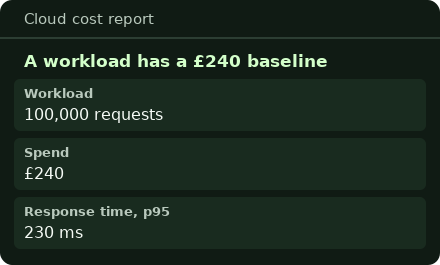
The same 100,000 requests cost £240 before a trial and £180 during it. A cheaper option fails the response-time check.
Illustrative demo: compare cost per 1,000 requests
Recreated screens. Fictional data.
Read the screen details
1. What comes in: A workload has a £240 baseline
Cloud cost report
- Workload
- 100,000 requests
- Spend
- £240
- Response time, p95
- 230 ms
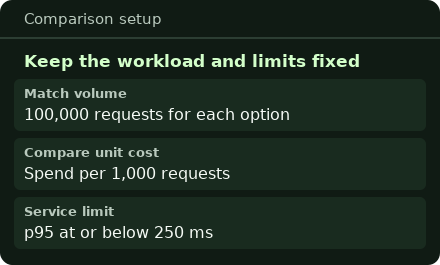
2. What the system checks: Keep the workload and limits fixed
Comparison setup
- Match volume
- 100,000 requests for each option
- Compare unit cost
- Spend per 1,000 requests
- Service limit
- p95 at or below 250 ms
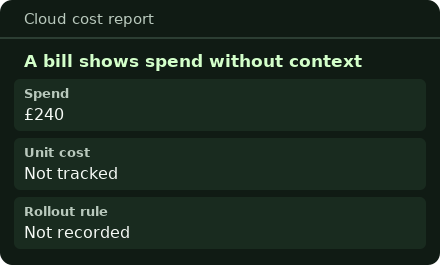
Without the solution: A bill shows spend without context
Cloud cost report
- Spend
- £240
- Unit cost
- Not tracked
- Rollout rule
- Not recorded
With the solution: The trial lowers unit cost
Cost and performance review
- Spend for 100,000 requests
- £180
- Cost per 1,000 requests
- £1.80 versus £2.40
- Response time, p95
- 240 ms; passes
Without the solution: An option looks cheaper on the bill
Cloud cost report
- Spend for 100,000 requests
- £150
- Response time, p95
- 290 ms
- Bill-only decision
- Cheapest option looks best
With the solution: The cheaper option fails the limit
Cost and performance review
- Response time, p95
- 290 ms; limit is 250 ms
- Decision
- Reject £150 candidate
- Keep the tested option
- £180 at 240 ms
3. See the result in the tool
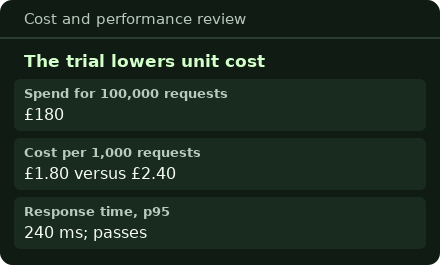
For 100,000 matched requests, spend falls from £240 to £180 in the example. Cost per 1,000 goes from £2.40 to £1.80 and p95 stays within 250 ms.
Exception: a cheaper option is too slow
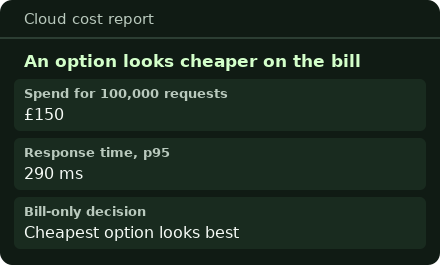
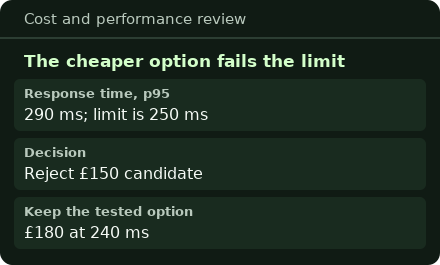
The £150 test reaches 290 ms at p95. Keep the £180 candidate because it passes the 250 ms limit. These figures are illustrative.
Tell us about one job you need to get right
Start with your name and email. Review the draft before you send it.
Email us directlyProject details
Delivery, cost factors, ownership, support and FAQs.
What you get
Find spend by workload
Use billing and usage records to connect spend with a team, environment or workload.
Test a safer option
Compare one change on a representative workload. Check cost per unit, latency and errors.
Record the decision
Save the test conditions, the reason to proceed or stop, and the recovery steps.
How we deliver and test it
Set a baseline
Agree the workload, period and limits. Document shared charges and exclusions.
Measure a candidate
Test the change with matched volume and agreed service checks.
Give the team a follow-up plan
Define when to review spend again and which conditions should stop or roll back a change.
What shapes the cost?
Review cost depends on the number of accounts and workloads, billing access and tests needed. Savings depend on usage, pricing and service limits.
Ownership and support
You keep control of your cloud accounts and billing data. You receive the baseline, test results and agreed changes. We agree who reviews cost after handover.
Meet the Synaptum teamCommon questions
Can we start with one workload?
Yes. Choose a workload with useful billing and usage records and agree how to compare it.
Can you guarantee a saving?
No. Spend depends on usage and rates. We test the change and report the result under stated conditions.
What if the cheaper option slows the service?
Keep the option out of rollout if it fails an agreed limit. Retain the tested baseline or choose another candidate.