DevOps Consulting Services
Release software with checks that tell your team what failed and how to recover safely.
The form prepares an email you can review and send.
Where we can help
- Set up build, test and release checks.
- Route an alert to the person who can act.
- Test rollback and block it when a database change makes it unsafe.
See an example
A failed release alerts the engineer. The system restores the last healthy version and verifies checkout.
Illustrative demo: recover a failed deployment
Recreated screens. Fictional data.
Read the screen details
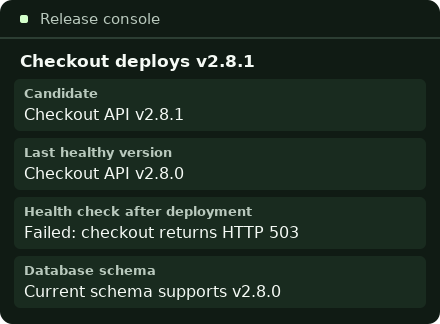
1. What comes in: Checkout deploys v2.8.1
Release console
- Candidate
- Checkout API v2.8.1
- Last healthy version
- Checkout API v2.8.0
- Health check after deployment
- Failed: checkout returns HTTP 503
- Database schema
- Current schema supports v2.8.0
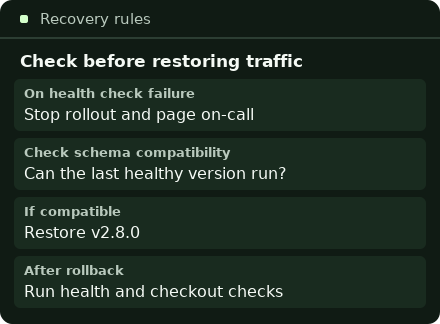
2. What the system checks: Check before restoring traffic
Recovery rules
- On health check failure
- Stop rollout and page on-call
- Check schema compatibility
- Can the last healthy version run?
- If compatible
- Restore v2.8.0
- After rollback
- Run health and checkout checks
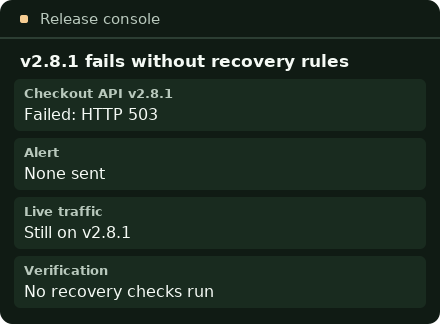
Without the solution: v2.8.1 fails without recovery rules
Release console
- Checkout API v2.8.1
- Failed: HTTP 503
- Alert
- None sent
- Live traffic
- Still on v2.8.1
- Verification
- No recovery checks run
With the solution: v2.8.0 is live and verified
Release console
- Checkout API v2.8.1
- Failed: HTTP 503
- Alert
- Page sent to on-call
- Live traffic
- Rolled back to healthy v2.8.0
- Verification
- Health and checkout checks pass
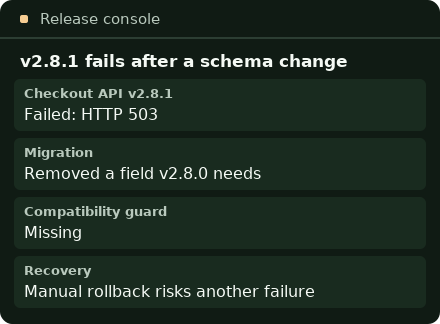
Without the solution: v2.8.1 fails after a schema change
Release console
- Checkout API v2.8.1
- Failed: HTTP 503
- Migration
- Removed a field v2.8.0 needs
- Compatibility guard
- Missing
- Recovery
- Manual rollback risks another failure
With the solution: The guard blocks rollback
Recovery log
- Checkout API v2.8.1
- Failed: rollout stopped
- v2.8.0 rollback
- Blocked: schema incompatible
- Alert
- On-call paged with migration details
- Recovery
- Open: engineer plans compatible fix
3. See the result in the tool
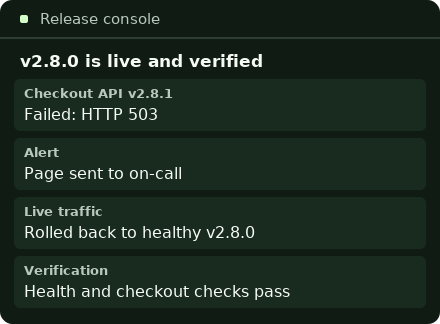
After v2.8.1 fails, the pipeline alerts the on-call engineer and restores v2.8.0. The health check and a checkout test both pass before recovery closes.
Exception: an incompatible migration blocks rollback
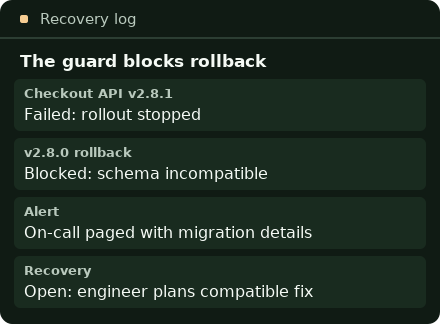
In this variant, the migration removes a field that v2.8.0 needs. The pipeline blocks rollback and pages the on-call engineer. The engineer owns the decision to repair the schema or deploy a compatible fix.
Tell us about one job you need to get right
Start with your name and email. Review the draft before you send it.
Email us directlyProject details
Delivery, cost factors, ownership, support and FAQs.
What you get
Build a repeatable CI/CD pipeline
Map the steps from code to production. Set up the build, tests and release checks in the tools your team can maintain.
Show what failed and who owns it
Link the release to health checks, logs and an alert for the person on call. Give that person the evidence to decide what to do.
Test the recovery path
Keep the last healthy release available. Check schema compatibility before rollback and verify the service after restoring traffic.
How we deliver and test it
Trace one release
Review a recent release, the environments and the current recovery steps. Agree which service and checks the first project covers.
Rehearse a failure
Use a test environment to trigger an alert and restore the last healthy version. Test that an incompatible migration blocks rollback.
Hand over the runbook
Give your team the release configuration, recovery checklist and alert routing. Confirm who can release, respond to alerts and keep the checks current.
What shapes the cost?
Cost depends on the number of services and environments, the current release setup and the work needed to test recovery. We scope implementation, infrastructure charges and ongoing support separately.
Ownership and support
You control your repositories, cloud accounts and deployment access. You own the custom work we build for you. Third-party tools keep their own licences. We agree who responds to alerts and what support covers.
Meet the Synaptum teamCommon questions
Can we keep our current CI/CD tools?
Yes, if they support the agreed tests and access controls. We first check what your accounts, environments and hosting platform allow.
Can every deployment roll back automatically?
Use automatic rollback only when the last healthy version can run with the current data and infrastructure. If a migration blocks rollback, stop the rollout and alert the on-call engineer.
Who responds to alerts after handover?
The delivery agreement names the alert owner and defines any support coverage. We test that the alert reaches that owner during the handover.