Data Engineering Services
Make reports match the records they come from. See what counted, what failed and why.
The form prepares an email you can review and send.
Where we can help
- Load records from your systems into one reporting pipeline.
- Check required fields and keep duplicate rows out of totals.
- Fix and reprocess rejected records without counting them twice.
See an example
Seven source rows represent five orders. After one correction, four orders count and one stays on hold.
Illustrative demo: reconcile an order batch
Recreated screens. Fictional data.
Read the screen details
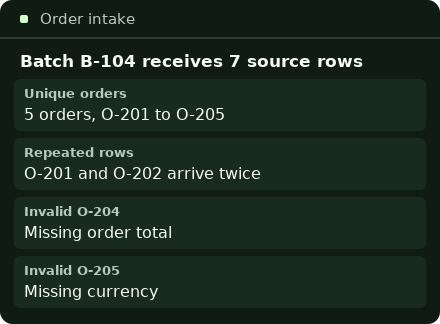
1. What comes in: Batch B-104 receives 7 source rows
Order intake
- Unique orders
- 5 orders, O-201 to O-205
- Repeated rows
- O-201 and O-202 arrive twice
- Invalid O-204
- Missing order total
- Invalid O-205
- Missing currency
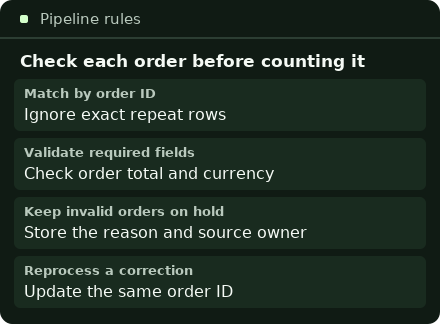
2. What the system checks: Check each order before counting it
Pipeline rules
- Match by order ID
- Ignore exact repeat rows
- Validate required fields
- Check order total and currency
- Keep invalid orders on hold
- Store the reason and source owner
- Reprocess a correction
- Update the same order ID
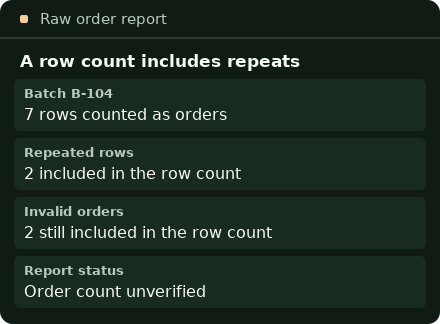
Without the solution: A row count includes repeats
Raw order report
- Batch B-104
- 7 rows counted as orders
- Repeated rows
- 2 included in the row count
- Invalid orders
- 2 still included in the row count
- Report status
- Order count unverified
With the solution: Five unique orders, two on hold
Batch reconciliation
- Batch B-104
- 7 rows, 5 unique orders
- Accepted orders
- 3
- Held orders
- 2: O-204 and O-205
- Excluded duplicate rows
- 2; outside the order totals
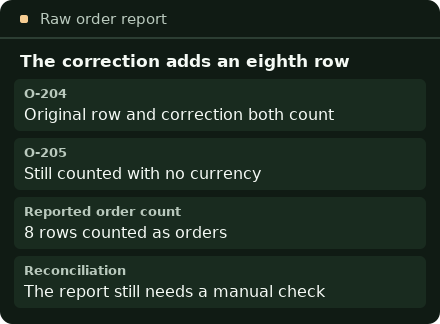
Without the solution: The correction adds an eighth row
Raw order report
- O-204
- Original row and correction both count
- O-205
- Still counted with no currency
- Reported order count
- 8 rows counted as orders
- Reconciliation
- The report still needs a manual check
With the solution: One reprocessed order counts once
Batch reconciliation
- Accepted orders
- 4, including reprocessed O-204
- Held orders
- 1: O-205, missing currency
- Reprocessed orders
- 1; included in the 4 accepted
- Open exception
- Source owner checks O-205
3. See the result in the tool
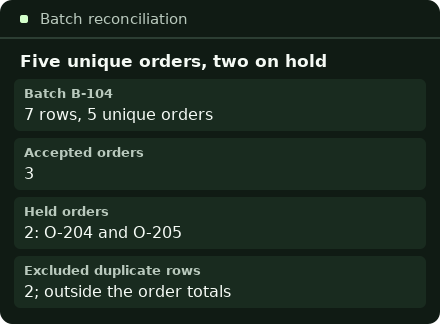
Batch B-104 contains 7 rows for 5 unique orders. The pipeline accepts 3 orders, holds 2 and excludes 2 duplicate rows from the totals.
Exception: one order stays on hold after reprocessing
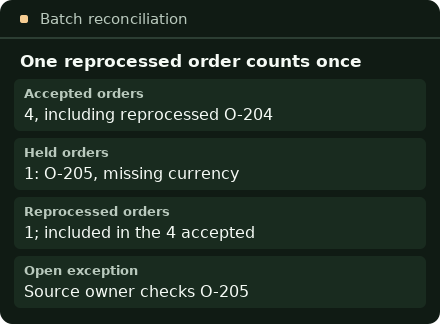
The pipeline reprocesses corrected order O-204 and accepts it once. O-205 still lacks a valid currency. Of the 5 unique orders, 4 are accepted and 1 stays on hold. The 1 reprocessed order is part of the accepted total of 4.
Tell us about one job you need to get right
Start with your name and email. Review the draft before you send it.
Email us directlyProject details
Delivery, cost factors, ownership, support and FAQs.
What you get
Connect the source to the report
Define what each field means, how often the pipeline runs and who owns the source. Build the steps that extract, transform and load the records.
Validate and match records
Check required fields and use a stable record key to catch duplicates. Keep invalid records outside reported totals and record why they wait.
Reprocess and reconcile
Retry corrected records against the same rules. Update the matching record and reconcile counts with the source before the report uses the result.
How we deliver and test it
Scope one pipeline
Choose one source, one destination and the report or process it supports. Agree on the record key, acceptable data and who owns exceptions.
Test the counts
Run a sample with repeated and invalid records. Check that replay keeps the same order key and that the totals match the record states.
Hand over the pipeline
Document the checks, error reasons and reprocessing steps. Confirm who owns quality reviews and who can change the rules or run a replay.
What shapes the cost?
Cost depends on the number of sources, the volume and history to process, and the rules each destination needs. We separate the build from hosting, storage and agreed support.
Ownership and support
You control your data, access and accounts. You own the custom pipeline code we build for you. Third-party tools keep their own licences. We agree who monitors the pipeline and who can correct and reprocess records.
Meet the Synaptum teamCommon questions
Can we start with one source and one report?
Yes. We first agree which records the report needs, how to match them and what counts as an acceptable result.
How do you avoid counting a reprocessed order twice?
We match the stable order ID and update that record. A recovered order enters the accepted total once, even if the same correction arrives again.
What if an order still fails validation?
The order stays on hold with the reason and owner. The report excludes it until the source owner supplies a valid correction.