API integration services
Make one system reflect what happened in another. We connect your tools and make failed deliveries recoverable.
The form prepares an email you can review and send.
Where we can help
- Sync payments, customer records or order status.
- Keep the same record when an event arrives twice.
- Show failed deliveries and give the owner a way to retry.
See an example
A payment arrives twice. The CRM shows one paid update and accounting keeps the same invoice.
Illustrative demo: one payment arrives twice
Recreated screens. Fictional data.
Read the screen details
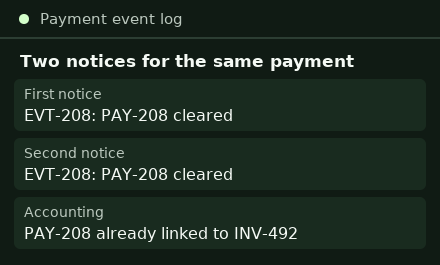
1. What comes in: Two notices for the same payment
Payment event log
- First notice
- EVT-208: PAY-208 cleared
- Second notice
- EVT-208: PAY-208 cleared
- Accounting
- PAY-208 already linked to INV-492
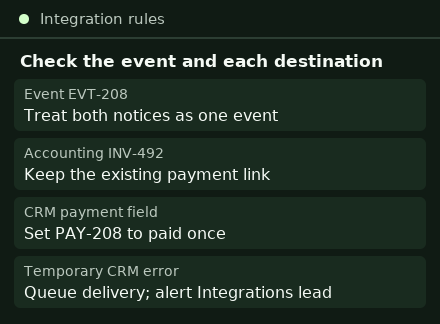
2. What the system checks: Check the event and each destination
Integration rules
- Event EVT-208
- Treat both notices as one event
- Accounting INV-492
- Keep the existing payment link
- CRM payment field
- Set PAY-208 to paid once
- Temporary CRM error
- Queue delivery; alert Integrations lead
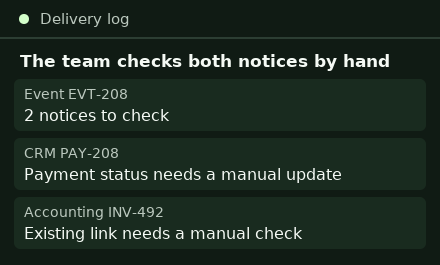
Without the solution: The team checks both notices by hand
Delivery log
- Event EVT-208
- 2 notices to check
- CRM PAY-208
- Payment status needs a manual update
- Accounting INV-492
- Existing link needs a manual check
With the solution: One CRM update, same invoice
Delivery log
- Event EVT-208
- First notice applied; repeat skipped
- CRM PAY-208
- Paid: 1 update
- Accounting INV-492
- Existing link kept; 0 new invoices
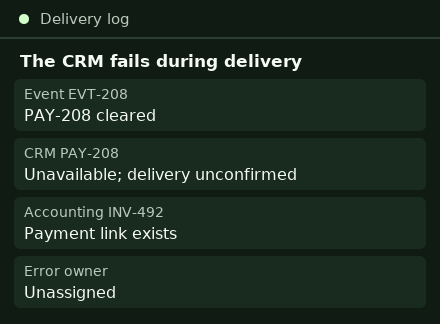
Without the solution: The CRM fails during delivery
Delivery log
- Event EVT-208
- PAY-208 cleared
- CRM PAY-208
- Unavailable; delivery unconfirmed
- Accounting INV-492
- Payment link exists
- Error owner
- Unassigned
With the solution: Replay the CRM delivery after recovery
Recovery queue
- Event EVT-208
- Saved during the CRM outage
- CRM PAY-208
- Paid: 1 update after safe replay
- Accounting INV-492
- Existing link kept; 0 new invoices
- Error owner
- Integrations lead
3. See the result in the tool
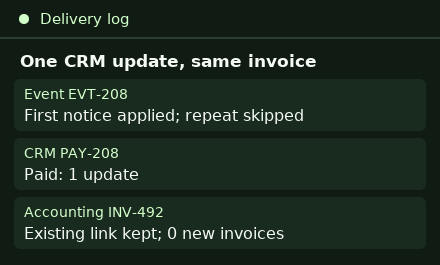
The integration records PAY-208 once in the CRM and keeps its existing link to invoice INV-492 in accounting.
The CRM is temporarily unavailable
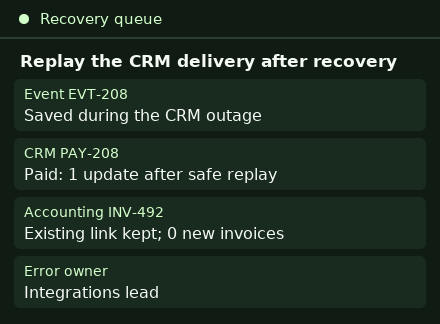
The integration saves the failed CRM delivery. The Integrations lead replays it after recovery, and accounting keeps the same invoice with zero new invoices.
Tell us about one job you need to get right
Start with your name and email. Review the draft before you send it.
Email us directlyProject details
Delivery, cost factors, ownership, support and FAQs.
What you get
Map the records and access
We agree which system owns each field, what data can move and which way it flows. We map record IDs and give each connection only the access it needs.
Deliver each event safely
We use a stable event ID to spot repeats. We queue temporary failures for retry and check the destination before replaying a delivery with an uncertain outcome.
Make failures visible
We compare records across systems and send unresolved differences to a named role. The delivery log shows what reached each system without exposing sensitive fields.
How we deliver and test it
Start with one flow
We agree the source, destination and expected record for one event. We confirm API access, rate limits and the roles that can investigate or replay a failed delivery.
Accept against real scenarios
Your team checks normal delivery, a repeated event and an outage in a test environment. In the payment example, check for one CRM update and the same invoice link after replay.
Hand over the recovery steps
We document field mappings, alerts and safe replay. Your team assigns an owner, and we agree who reviews failures and maintains the connection when an API changes.
What shapes the cost?
Setup cost depends on the number of systems, workflow rules, API limits and the work needed to compare records. We separate hosting, vendor fees and ongoing support from the build cost.
Ownership and support
You control your accounts and data and own the custom code we build for you. Third-party services and components keep their own license terms.
Meet the Synaptum teamCommon questions
Can you connect the tools we already use?
We check each tool's API, permissions and limits before we quote. We document any steps that need a manual check.
What happens if a system is unavailable?
The integration saves the failed delivery and retries within agreed limits. If retries run out, the named owner gets an alert and checks the delivery before replaying it.
Do I need an integration or workflow automation?
Choose API integration when the main job is to exchange records between systems. Choose workflow automation when the main job is to coordinate tasks, approvals or handoffs.
Does this include accounting or CRM setup?
The connection follows your existing invoice and CRM rules. Accounting reconciliation and CRM setup have their own scope, owners and acceptance checks.