Invoice Processing Automation
Keep duplicate or unmatched invoices out of your accounts. Give finance one queue for records that need a closer look.
The form prepares an email you can review and send.
Where we can help
- Capture invoice fields and check supplier, amount and currency.
- Match payments using stable references and prevent duplicate entries.
- Send mismatches to finance with a reason and supporting records.
See an example
A supplier invoice arrives twice. The workflow keeps one entry, matches its payment and holds a different invoice for finance.
Illustrative demo: reconcile a repeated invoice
Recreated screens. Fictional data.
Read the screen details
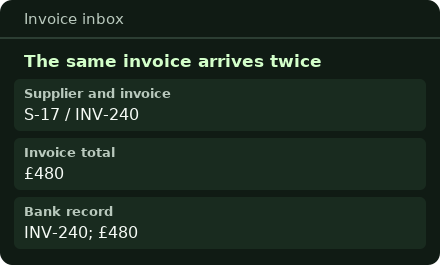
1. What comes in: The same invoice arrives twice
Invoice inbox
- Supplier and invoice
- S-17 / INV-240
- Invoice total
- £480
- Bank record
- INV-240; £480
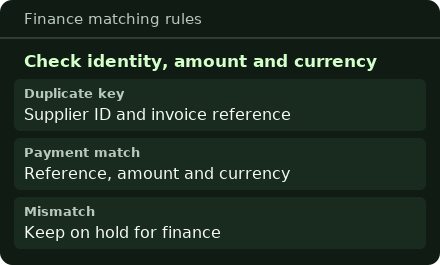
2. What the system checks: Check identity, amount and currency
Finance matching rules
- Duplicate key
- Supplier ID and invoice reference
- Payment match
- Reference, amount and currency
- Mismatch
- Keep on hold for finance
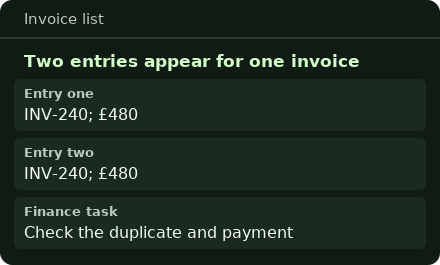
Without the solution: Two entries appear for one invoice
Invoice list
- Entry one
- INV-240; £480
- Entry two
- INV-240; £480
- Finance task
- Check the duplicate and payment
With the solution: One invoice matches one bank record
Accounts ledger
- Invoice
- INV-240; £480
- Status
- Matched to existing payment
- Duplicate delivery
- Skipped; no new payment made
Without the solution: A reference matches but the amount differs
Finance spreadsheet
- Invoice
- INV-241; £720
- Bank record
- INV-241; £700
- Difference
- £20 still needs checking
With the solution: The £20 difference stays on hold
Finance exception queue
- Invoice
- INV-241; unmatched
- Reason
- £720 invoice versus £700 payment
- Next action
- Finance reviews source records
3. See the result in the tool
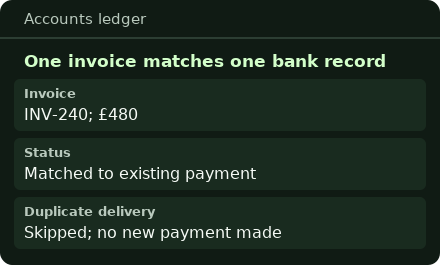
Two deliveries of INV-240 create one £480 invoice. The workflow matches the bank record and makes no new payment.
Exception: the payment amount differs
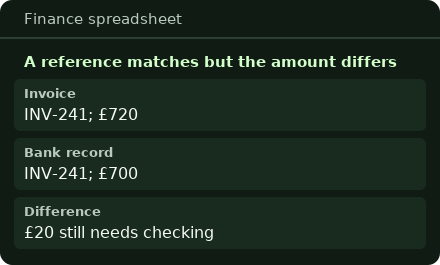
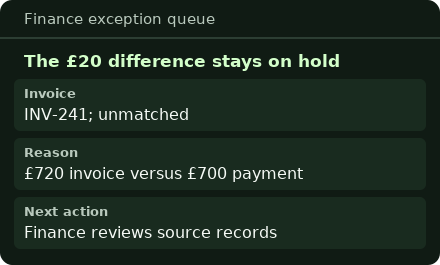
INV-241 stays on hold: the invoice is £720 and the bank record shows £700. Finance reviews the £20 difference.
Tell us about one job you need to get right
Start with your name and email. Review the draft before you send it.
Email us directlyProject details
Delivery, cost factors, ownership, support and FAQs.
What you get
Check invoice details
Agree fields and validation rules with finance. Keep the original document linked to the record.
Match records
Use stable supplier and invoice references. Compare currency and amount before marking a payment as matched.
Route exceptions
Keep uncertain records on hold with a reason. Give finance the source records and a clear next step.
How we deliver and test it
Map one invoice flow
Choose the inbox or system, accounting destination and payment source. Agree the rules with finance.
Test matches and exceptions
Run examples with duplicates, unpaid invoices and incorrect amounts. Verify ledger and queue state.
Hand over the checks
Document which records the workflow updates, who reviews holds and how to replay a corrected input.
What shapes the cost?
Cost depends on invoice sources, record volume, accounting access and the number of matching rules. Licences and agreed support are separate.
Ownership and support
You keep control of your accounting records and accounts. You own the custom workflow code we build for you. Finance owns the matching rules and exception decisions.
Meet the Synaptum teamCommon questions
How do you detect duplicate invoices?
We agree a stable key, such as supplier ID and invoice reference. An exact repeat does not create a second entry.
Does the workflow make payments?
The example validates invoices and matches bank records. Payment authorization is outside that scope.
What if a payment has the wrong amount?
The invoice stays unmatched with the discrepancy recorded. Finance checks the invoice and payment before changing its status.