ERP & E-commerce Integration Services
Send store orders to your ERP and show customers the stock they can buy. Give your team a clear way to resolve mismatches.
The form prepares an email you can review and send.
Where we can help
- Send store orders to the ERP with the right product and quantity.
- Publish available stock from the ERP after a confirmed reservation.
- Hold unknown products and reconcile orders after a delivery problem.
See an example
An online order reserves two units in the ERP. The store shows the new quantity, even if the order event arrives again.
Illustrative demo: one order reserves two units
Recreated screens. Fictional data.
Read the screen details
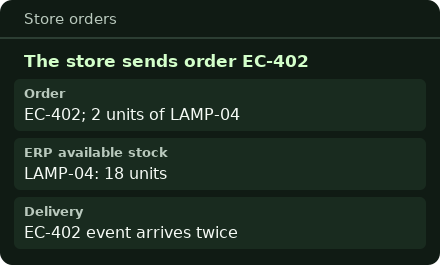
1. What comes in: The store sends order EC-402
Store orders
- Order
- EC-402; 2 units of LAMP-04
- ERP available stock
- LAMP-04: 18 units
- Delivery
- EC-402 event arrives twice
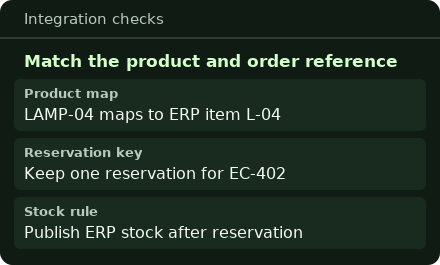
2. What the system checks: Match the product and order reference
Integration checks
- Product map
- LAMP-04 maps to ERP item L-04
- Reservation key
- Keep one reservation for EC-402
- Stock rule
- Publish ERP stock after reservation
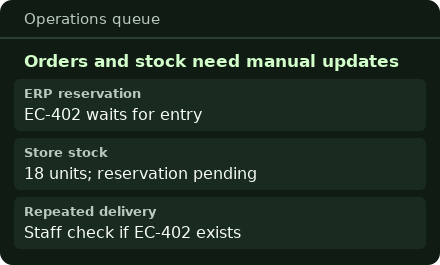
Without the solution: Orders and stock need manual updates
Operations queue
- ERP reservation
- EC-402 waits for entry
- Store stock
- 18 units; reservation pending
- Repeated delivery
- Staff check if EC-402 exists
With the solution: One reservation and 16 available
ERP and store status
- ERP reservation
- RS-402: 2 units of L-04
- Available stock
- ERP: 16; store: 16
- Repeat delivery
- Existing RS-402 kept; stock stays 16
Without the solution: An unknown product blocks entry
Operations queue
- Store order
- EC-403: SKU LAMP-X
- ERP item
- Staff search for a matching code
- Stock update
- Waits for a product decision
With the solution: Hold EC-403 and keep stock intact
Exception queue
- Queue owner
- Operations reviews unknown LAMP-X
- ERP reservation
- None for EC-403
- Available stock
- LAMP-04 remains at 16
3. See the result in the tool
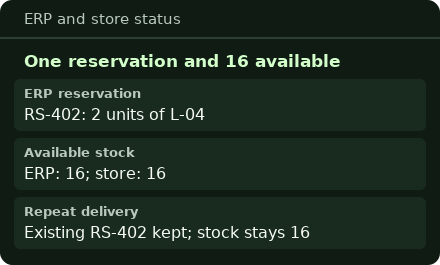
Order EC-402 reserves two units once in the ERP. Available stock falls from 18 to 16, and the store shows 16. A repeat delivery leaves both counts at 16.
The store sends an unknown SKU
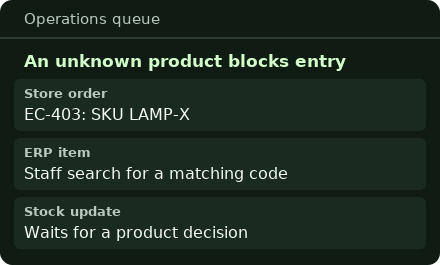
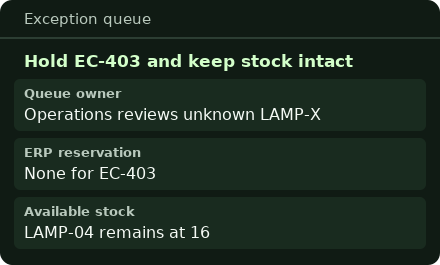
Order EC-403 goes to the Operations review queue. The integration creates no reservation and keeps the published stock at 16.
Tell us about one job you need to get right
Start with your name and email. Review the draft before you send it.
Email us directlyProject details
Delivery, cost factors, ownership, support and FAQs.
What you get
Agree which system owns each record
The store supplies the order reference and the ERP supplies available stock in this example. We agree which system owns each field in your workflow.
Map products and order lines
We check product codes, variants and units. We use a stable order reference to prevent a repeat delivery from creating another reservation.
Reconcile orders and quantities
We compare store orders, ERP reservations and published stock. Your team gets a review queue for mismatches and a record of each outcome.
How we deliver and test it
Check your store and ERP
We confirm the products, APIs, permissions and limits for one order flow. We agree which changes can move between the systems.
Test the accepted results
Check a valid order, a repeated event and an unknown product in a test environment. Verify the reservation and the displayed stock in both tools.
Hand over exception handling
We document the mapping, alerts and replay checks. Agree who owns the queue and how to pause or resume publication.
What shapes the cost?
Cost depends on the order rules, product variants, stock locations and available interfaces. We scope returns, fulfillment and historical imports separately.
Ownership and support
You control your accounts and data and own the custom code we build for you. Third-party tools keep their license terms.
Meet the Synaptum teamCommon questions
Can you connect the systems we use?
We check your store and ERP APIs, permissions and rate limits before quoting. The supported workflow depends on what both systems can read and write.
What if the same order arrives twice?
The integration checks the store order reference and looks for an existing ERP reservation before replay. A repeated delivery keeps the existing reservation.
Do returns and multiple warehouses come with the first flow?
We agree those rules separately. A first flow can cover new orders and available stock for one location.