Quote-to-Cash Automation
Prepare a quote and follow it through acceptance, order, invoice and payment status. Give each team a clear next step.
The form prepares an email you can review and send.
Where we can help
- Prepare a quote and carry the accepted terms into the order.
- Link the order and invoice to the same sale.
- Read payment status from accounting and route discrepancies to Finance.
See an example
Sales prepares a quote from the price list. The accepted version becomes an order and links to the invoice and recorded payment status.
Illustrative demo: follow an accepted quote through billing
Recreated screens. Fictional data.
Read the screen details
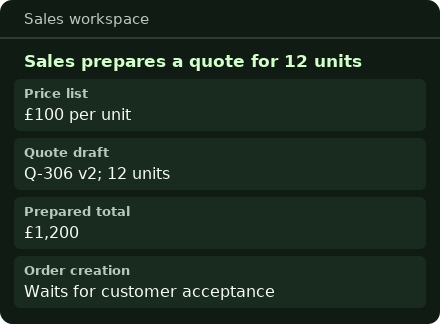
1. What comes in: Sales prepares a quote for 12 units
Sales workspace
- Price list
- £100 per unit
- Quote draft
- Q-306 v2; 12 units
- Prepared total
- £1,200
- Order creation
- Waits for customer acceptance
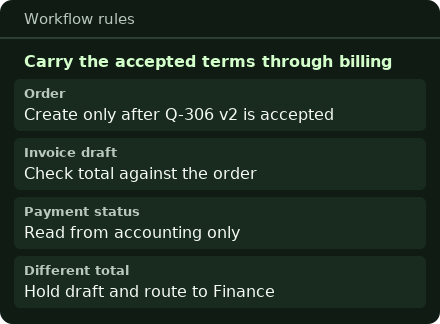
2. What the system checks: Carry the accepted terms through billing
Workflow rules
- Order
- Create only after Q-306 v2 is accepted
- Invoice draft
- Check total against the order
- Payment status
- Read from accounting only
- Different total
- Hold draft and route to Finance
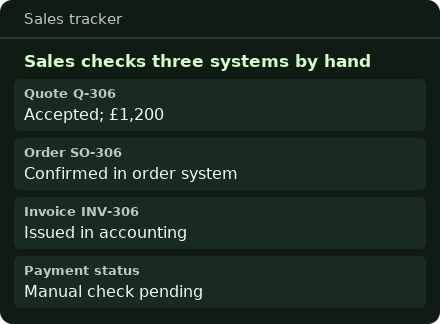
Without the solution: Sales checks three systems by hand
Sales tracker
- Quote Q-306
- Accepted; £1,200
- Order SO-306
- Confirmed in order system
- Invoice INV-306
- Issued in accounting
- Payment status
- Manual check pending
With the solution: One sale shows the order, invoice and status
Sales tracker
- Quote Q-306
- Accepted; £1,200
- Order SO-306
- Confirmed; £1,200
- Invoice INV-306
- Issued; £1,200
- Payment status
- Paid; read from accounting
Without the solution: The draft total differs from the order
Billing worksheet
- Quote Q-307
- Accepted; £1,200
- Order SO-307
- Confirmed; £1,200
- Invoice draft INV-307
- £1,260; review pending
- Review owner
- Unassigned
With the solution: Finance receives the held draft
Finance queue
- Invoice draft INV-307
- Held before issue
- Order SO-307
- £1,200 versus £1,260 on draft
- Finance task
- Review the £60 difference
- Payment status
- Blank; awaiting invoice issue
3. See the result in the tool
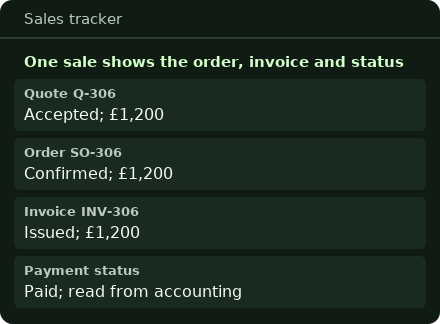
Quote Q-306 links to order SO-306 and invoice INV-306. The sales record shows Paid after accounting reports it through a read-only connection.
Exception: an invoice draft total differs from the order total
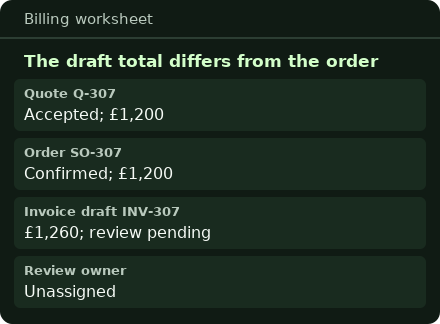
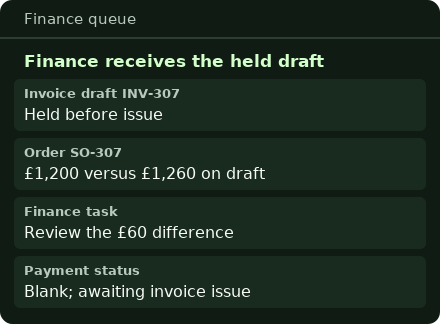
The workflow holds the £1,260 draft against the £1,200 order. Finance receives both records and the £60 difference. The payment status stays blank.
Tell us about one job you need to get right
Start with your name and email. Review the draft before you send it.
Email us directlyProject details
Delivery, cost factors, ownership, support and FAQs.
What you get
Prepare quotes and carry accepted terms into orders
Use agreed prices to prepare each quote. Keep its version, items and quantities when the customer accepts and the order is created.
Connect billing and payment status
Link the customer invoice to the order and show the payment status that accounting records. Give the workflow read-only access to payment status.
Route differences to Finance
Compare invoice drafts with the sales order. Hold a draft with a different total and give Finance both records to review.
How we deliver and test it
Map one sales flow
Agree which systems and people own quote preparation, acceptance, fulfilment and billing.
Test a sale and a discrepancy
Your team checks that the order uses the accepted quote, that the invoice links to the order and that accounting supplies payment status. Test a draft total that differs from the order.
Give each team a clear next step
We document field mappings, the Finance queue and the checks to run before releasing a held draft. Finance owns that decision.
What shapes the cost?
Cost depends on the systems, quote rules, billing steps and exceptions. We scope licences and ongoing support separately.
Ownership and support
You control the sales and accounting records and own the custom workflow code we build for you. Finance owns billing rules and exception decisions.
Meet the Synaptum teamCommon questions
Where does quote-to-cash automation start?
Start by preparing a quote with agreed prices. Follow the accepted version through the order, invoice and recorded payment status.
How does this differ from invoice matching?
Quote-to-cash connects the stages of a sale. Invoice matching compares invoices with existing payment records and belongs to accounting automation.
Does the workflow initiate payments?
It only reads payment status from accounting. Payment initiation and authorization stay outside the workflow.
What happens when an invoice total differs from the order total?
The workflow holds the invoice draft and sends both totals with the linked records to Finance. Finance decides what to correct before billing.