CRM implementation services
Set up your CRM so every enquiry has a record, an owner and a next action.
The form prepares an email you can review and send.
Where we can help
- Set up pipelines, permissions and ownership rules.
- Link form, email and call activity to the right contact.
- Train the team to handle duplicates and exceptions.
See an example
Three messages about one quote appear on one contact record. Conflicting identities stay separate for review.
Illustrative demo: one lead across three channels
Recreated screens. Fictional data.
Read the screen details
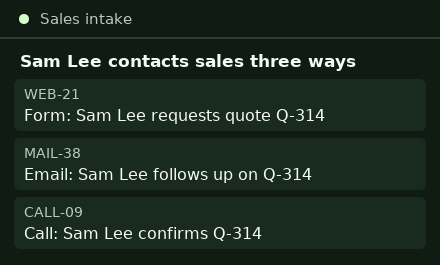
1. What comes in: Sam Lee contacts sales three ways
Sales intake
- WEB-21
- Form: Sam Lee requests quote Q-314
- MAIL-38
- Email: Sam Lee follows up on Q-314
- CALL-09
- Call: Sam Lee confirms Q-314
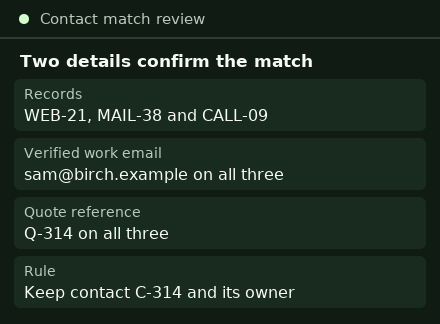
2. What the system checks: Two details confirm the match
Contact match review
- Records
- WEB-21, MAIL-38 and CALL-09
- Verified work email
- sam@birch.example on all three
- Quote reference
- Q-314 on all three
- Rule
- Keep contact C-314 and its owner
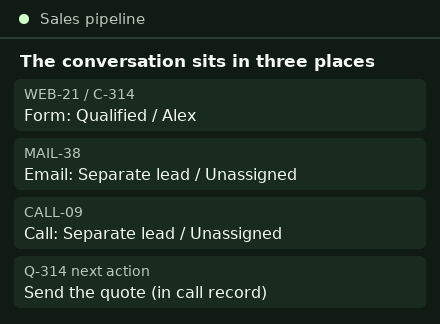
Without the solution: The conversation sits in three places
Sales pipeline
- WEB-21 / C-314
- Form: Qualified / Alex
- MAIL-38
- Email: Separate lead / Unassigned
- CALL-09
- Call: Separate lead / Unassigned
- Q-314 next action
- Send the quote (in call record)
With the solution: One contact and a clear next action
Sales pipeline
- C-314 owner
- Alex / 1 contact for Sam Lee
- Activity history
- WEB-21, MAIL-38 and CALL-09
- Q-314 stage
- Qualified
- Q-314 next action
- Send the quote
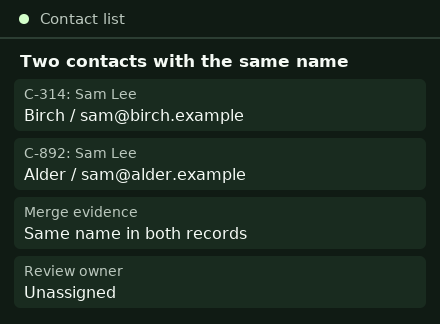
Without the solution: Two contacts with the same name
Contact list
- C-314: Sam Lee
- Birch / sam@birch.example
- C-892: Sam Lee
- Alder / sam@alder.example
- Merge evidence
- Same name in both records
- Review owner
- Unassigned
With the solution: Conflicting details hold the merge
Identity review queue
- C-314: Sam Lee
- Birch / sam@birch.example
- C-892: Sam Lee
- Alder / sam@alder.example
- Merge status
- On hold: email and company differ
- Review owner
- Sales data steward
3. See the result in the tool
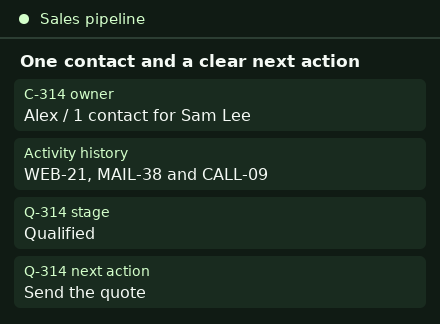
One contact keeps the web form, email and call. The same owner sees the deal stage and the next action in the pipeline.
The name matches, but the identity conflicts
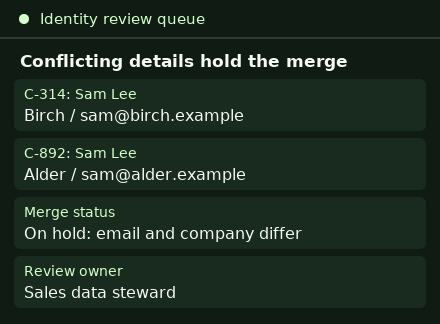
The CRM holds the merge for the sales data steward. The records stay separate while the steward checks the two verified emails and company records.
Tell us about one job you need to get right
Start with your name and email. Review the draft before you send it.
Email us directlyProject details
Delivery, cost factors, ownership, support and FAQs.
What you get
Define stages and follow-up
We configure fields, pipeline stages and owner rules with your sales team. Each stage has a clear next action and a rule for when a deal can move forward.
Match leads with evidence
We agree which fields can confirm a match. The CRM keeps source activity on one contact and sends conflicting identities to a review queue.
Set permissions and reports
We set who can view, edit, merge and export records. We build views for open deals, overdue follow-up and records that need an owner.
How we deliver and test it
Agree the setup and cutoff
We map one sales pipeline and agree what data belongs in it. If you replace a CRM, we agree a cutoff and a way to capture activity that arrives during the switch.
Test with the sales team
Your sales lead checks that matching leads keep their activity and owner. The team also checks the next action, access permissions and the review path for a conflicting identity.
Train users and hand over access
We train sales staff on daily tasks and give administrators a guide to the setup. We agree who reviews duplicates, maintains sales rules and trains new users.
What shapes the cost?
Cost depends on the number of teams, pipelines, roles, reports and training needs. We price licenses, custom connections and any historical data migration separately.
Ownership and support
You control the CRM account, records and admin access. You own the custom code we build for you, and your CRM provider sets the platform license terms.
Meet the Synaptum teamCommon questions
Can you work with our existing CRM?
Yes, if your plan and permissions support the setup. We check the features you need before we recommend any custom work.
Does CRM implementation include a migration?
Implementation sets up how your team works in the CRM. A migration needs its own scope for historical data, cleanup, imports and record checks.
What if two leads have the same name?
The CRM checks other evidence, such as a verified email address and a quote reference. A data steward reviews conflicting records before any merge.
When do we need a custom integration?
Use the CRM's built-in features for stages, permissions and supported connections. Scope a custom integration when another system must exchange data beyond those features.