
Skip to content
SYNAPTUM DIGITALLet’s talk

Products & internal tools

Custom software development services

Build the app or internal tool your team needs when your current software cannot handle the job.

The form prepares an email you can review and send.

Miguel Ángel & MiriamMeet your project team

Where we can help

  • Build a first version of a product or internal tool.
  • Replace a spreadsheet process with a shared application.
  • Add a feature to the software you already run.

See an example

A contractor gets access to one project. The portal rejects a forwarded invitation and blocks access to other projects.

Service demo

Give a contractor access to one project

Recreated screens. Fictional data.

Read the screen details
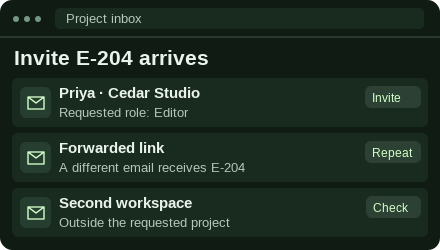
What comes in
Invite E-204 names Priya as an editor on Cedar only. The link also reaches another email address.
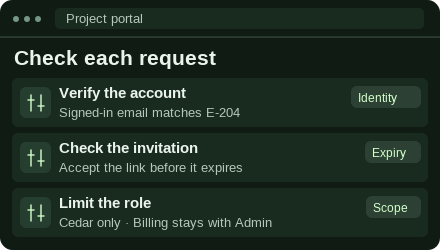
What the app checks
Check the signed-in email and link expiry. Grant access to Cedar only. Apply the editor role when Priya accepts.
Access requestWithout the portalWith the portal
Priya · Cedar filesWaiting for folder linkCedar editor
Forwarded invitationRecipient unknownDenied · Email differs
Priya · Second workspaceOwner checks permissions by handDenied · Different workspace

Try another case: Priya misses the expiry date

Access requestWithout the portalWith the portal
E-204 · Opened after expiryPriya asks whether the link still worksInvite expired · Project stays closed

The owner can issue a fresh invitation.

1. What comes in
Project inbox: Invite E-204 arrives; Priya · Cedar Studio. Requested role: Editor. Invite; Forwarded link. A different email receives E-204. Repeat; Second workspace. Outside the requested project. Check
2. What the system checks
Project portal: Check each request; Verify the account. Signed-in email matches E-204. Identity; Check the invitation. Accept the link before it expires. Expiry; Limit the role. Cedar only · Billing stays with Admin. Scope

3. See the result in the tool

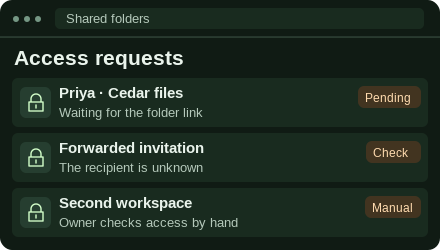
Without the portal
Shared folders: Access requests; Priya · Cedar files. Waiting for the folder link. Pending; Forwarded invitation. The recipient is unknown. Check; Second workspace. Owner checks access by hand. Manual
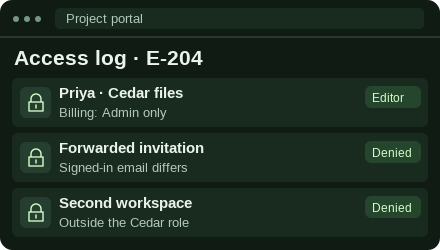
With the portal
Project portal: Access log · E-204; Priya · Cedar files. Billing: Admin only. Editor; Forwarded invitation. Signed-in email differs. Denied; Second workspace. Outside the Cedar role. Denied

Priya can edit Cedar files. Billing stays with the administrator. The portal records both denials.

Try another case: Priya misses the expiry date
Without the portal
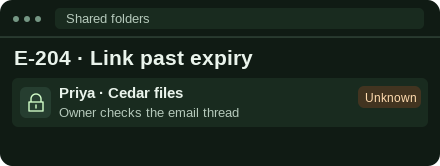
Shared folders: E-204 · Link past expiry; Priya · Cedar files. Owner checks the email thread. Unknown
With the portal
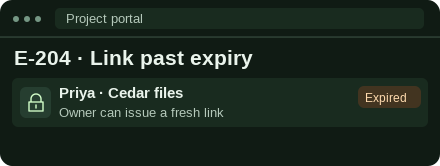
Project portal: E-204 · Link past expiry; Priya · Cedar files. Owner can issue a fresh link. Expired

The owner can issue a fresh invitation.

See how we would deliver this

How we would build it for you

We build
The invitation flow, project permissions and access log.
You provide
Who can invite people and what each role can see or edit.
We verify together
A valid invite works. The portal denies expired invites and accounts with a different email.
Show us an access problem you need to solve
More examples

SaaS invitations

Workspace members

  • editor@cedar.exampleEditor roleInvitation accepted
  • viewer@cedar.exampleViewer roleInvitation pending
  • former@cedar.exampleAccess stays closedInvitation expired

An administrator picks a role. An active invitation grants that role when the recipient accepts.

See the test for saas invitations

Test three invitations. An expired invitation grants zero access. Test that the editor cannot change billing.


Customer portal

Account orders

  • Cedar Workshop · ORD-204Ship date: 12 JunOrder shipped
  • Cedar Workshop · ORD-205Waiting for packingOrder confirmed
  • Other accountOrder details stay privateAccess denied

The portal checks the signed-in account before displaying an order or its tracking details.

See the test for customer portal

Test that the signed-in account can open both of its orders and zero orders from other accounts.

Internal approvals

Approval queue

  • REQ-018 · EquipmentOperations lead · 12 JunApproved
  • REQ-019 · TrainingAssigned to Operations leadWaiting for approval
  • REQ-019 · Requester roleDecision remains pendingApproval blocked

The requester submits a record. An authorized approver can decide, and the queue keeps the decision and its owner.

See the test for internal approvals

Try one approval per role. Expect one record with an approver and date, and zero approvals by requesters.

Ways to work with us

We offer project-based, full-time, part-time and hourly options. We confirm what fits the scope of your work and our team’s availability.

One conversation

Show us the job that slows you down

Tell us who does the job, where it gets stuck and which tools they use. Keep passwords and customer records out of the first message.

Talk to Synaptum

Discuss your software project

Start with your name and email. The form prepares a draft for you to review and send in your email app.

info@synaptumdigital.com
Project details

Delivery, cost factors, ownership, support and FAQs.

Scope & deliverables

What we can build with you

Choose the first job your team or your customers need to finish.

Internal tools

Replace one spreadsheet task with a tool your team can use. Start with a request, an owner and an approval record.

Customer portals

Give customers a place to do one job, such as checking an order. Define what each account can see before connecting live records.

SaaS features

Build one useful part of a product, such as inviting a teammate. Agree on the screens, the rules behind them and the tests for a first release.

Illustrative example

Buy, connect or build?

Three fictional teams need to approve purchase requests. Use these questions to see where each team could start.

Buy

Does a standard tool cover the job?

A team needs one manager’s approval and a history. Use a standard tool and check that the team can export the history.

Connect

Do the current tools work on their own?

A team approves requests in one tool and retypes them in accounting. Connect the tools and check that a repeat request creates one record.

Build

Do your rules need their own software?

A team needs different approval limits for each site and budget. Build one approval flow and check what happens when a request crosses a limit.

Each option starts with one testable task. Check the rules and the data before choosing what to build.

Fictional data. This example represents a possible design. It uses no live tools or client records.

Integrations & data

Keep the tools that work

We check what your CRM, accounting tools or current software can share through an API. We agree which system owns each record and who can see or change it. We use test data to check duplicate records, failed connections and permissions before using live data.

Explore workflow automation

How we work

Agree what done looks like

We agree the first milestone and how your team will check it before we build.

Need a repair plan or a safer release? Review your existing code Plan release checks and rollback

  1. Define the first task

    Walk through one real task with the people who do it. Agree who can take each action and which result counts as done.

  2. Try a small release

    Review the screens and rules with your team. Build the path and test it against the tools that need to connect.

  3. Accept the work together

    Run the agreed examples, including a failed connection and a user without permission. Confirm who handles exceptions before rollout.

What shapes the cost?

The cost depends on the screens, business rules, connections and data to migrate. Existing code and data quality affect how much we need to check. We agree the first milestone, timing and price before work starts. Price hosting, licences and ongoing support separately.

Ownership & support

Own the software and control the data

You own the software we develop for your project and keep control of your data. We agree access and hand over the code, setup instructions and a guide to the checks. Third-party tools and open source components keep their own licences.

Before work starts, agree who handles fixes, monitoring and new features. Set the review frequency and scope if you want us to maintain the software.

Engineering & operations

Meet your project team

Work directly with a small studio. We confirm the people and responsibilities for each project before work starts.

Miguel Ángel Rasero

Miguel Ángel Rasero

AI & software engineering

Scopes the software, data and connections. Plans the checks for release.

Miriam Alonso

Miriam Alonso

Automation & process improvement

Works through the task with your team and checks how they handle exceptions.

UX and design partners plan how people use the service. Frontend partners build the interface. DevOps partners help with deployment and monitoring. Marketing partners help with enquiries and follow-up. AI engineers help test features that need AI. We confirm which partners will take part for each project.

Before we start

Software development FAQs

When should we buy software?

Choose a standard tool if it covers your main task, permissions and reporting. Check how you can export your data before you commit.

Can you work with our existing software?

Yes, when we can access the code or an API. We check what can stay, how to test the change and what your team will need to maintain.

Do we need AI in the product?

A rule can handle a task with a clear answer. If the task depends on interpretation, we can assess where AI and human review would help.

Explore AI consulting
What if we mainly need a public website?

Start with web development if the main job is to present your offer, let your team edit content or route enquiries.

Explore web development

Talk to Synaptum

Tell us where you need a hand.

Loading the enquiry form…

Use the contact sectionEmail us directly