Code Review and Software Audit Services
Find out why an existing application fails and what to fix first. Give your team a report they can verify.
The form prepares an email you can review and send.
Where we can help
- Review a defined part of the codebase, architecture and tests.
- Show which findings affect real tasks and how to check them.
- Prioritize repairs and agree which tests prove they work.
See an example
Two cancelled orders inflate an export. The audit traces the difference between the dashboard and the file and defines a test for the repair.
Illustrative demo: find why an order export is wrong
Recreated screens. Fictional data.
Read the screen details
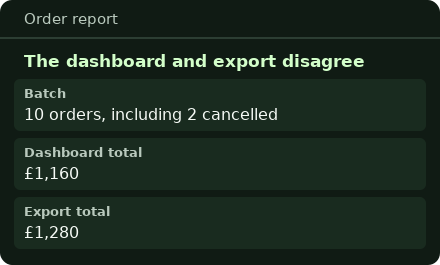
1. What comes in: The dashboard and export disagree
Order report
- Batch
- 10 orders, including 2 cancelled
- Dashboard total
- £1,160
- Export total
- £1,280
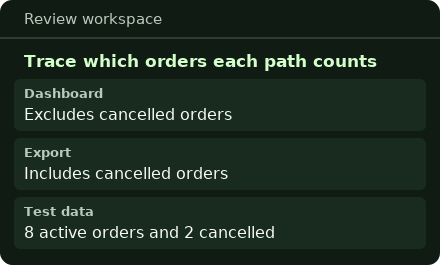
2. What the system checks: Trace which orders each path counts
Review workspace
- Dashboard
- Excludes cancelled orders
- Export
- Includes cancelled orders
- Test data
- 8 active orders and 2 cancelled
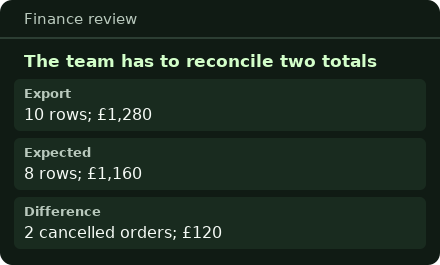
Without the solution: The team has to reconcile two totals
Finance review
- Export
- 10 rows; £1,280
- Expected
- 8 rows; £1,160
- Difference
- 2 cancelled orders; £120
With the solution: A finding names the cause and test
Audit report
- Finding
- Export counts cancelled orders
- Priority
- High: finance export totals are wrong
- Repair
- Use the agreed order filter
- Acceptance check
- 8 rows and £1,160 after the repair
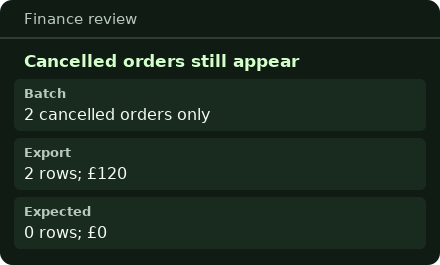
Without the solution: Cancelled orders still appear
Finance review
- Batch
- 2 cancelled orders only
- Export
- 2 rows; £120
- Expected
- 0 rows; £0
With the solution: An edge-case test covers an empty export
Audit report
- Fixture
- 2 cancelled orders only
- Expected rows
- 0
- Expected total
- £0
3. See the result in the tool
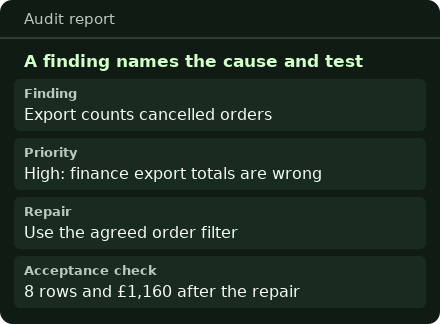
The review finds two cancelled orders in the export and defines a test with an expected total of £1,160. The repair is a separate step.
Exception: the export batch has only cancelled orders
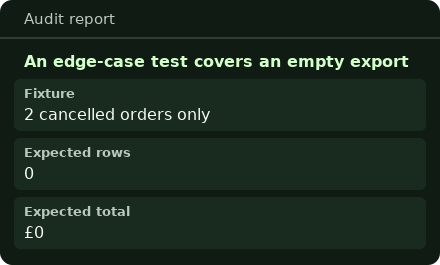
The audit adds an acceptance check for zero rows and a £0 total. The test guards against a repair that works only on mixed batches.
Tell us about one job you need to get right
Start with your name and email. Review the draft before you send it.
Email us directlyProject details
Delivery, cost factors, ownership, support and FAQs.
What you get
Review a defined system
Agree the code paths, integrations and changes to examine. Focus on tasks that matter to your team.
Record evidence
Explain each finding with a safe test, its effect and the conditions that produce it.
Order the repairs
Rank findings by impact and agree which changes and tests your team will own.
How we deliver and test it
Agree the review boundary
List the repositories, affected tasks and test data. Use read-only access where possible.
Check representative failures
Inspect the relevant code and compare results with agreed expectations.
Walk through the report
Confirm the repair order and acceptance tests. Scope implementation separately.
What shapes the cost?
Cost depends on the code scope, test setup, integration count and depth of review. Fixes and follow-up checks are scoped separately.
Ownership and support
You keep control of your code and receive the report and agreed supporting tests. We agree who implements fixes and verifies the next release.
Meet the Synaptum teamCommon questions
Can you review one part of the codebase?
Yes. Choose a task, module or release and agree its boundaries before the review.
Do you fix the findings?
The audit includes a repair plan. We can scope the implementation separately.
Do you need production records?
Use fixtures or anonymized records when they reproduce the issue. Agree any access in advance.