
Skip to content
SYNAPTUM DIGITALLet’s talk

Websites, content & enquiries

Web development services

Build a website that helps visitors understand your offer and lets your team see what happens to each enquiry.

The form prepares an email you can review and send.

Miguel Ángel & MiriamMeet your project team

Where we can help

  • Build or replace a service website.
  • Connect enquiry forms to your CRM.
  • Give your team a way to manage content and check form delivery.

See an example

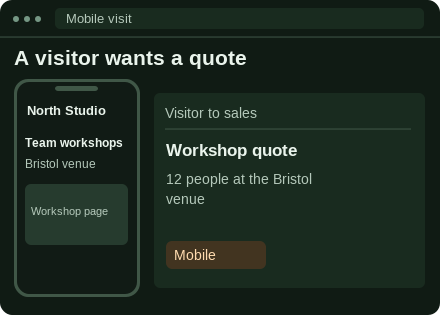
A mobile visitor requests a quote. The local sales team receives the group size, venue and source page.

Service demo

Turn a mobile quote request into an assigned enquiry

Recreated screens. Fictional data.

Read the screen details
What comes in
A visitor wants a quote for 12 people at the Bristol venue. The visitor starts on a phone.
What we build
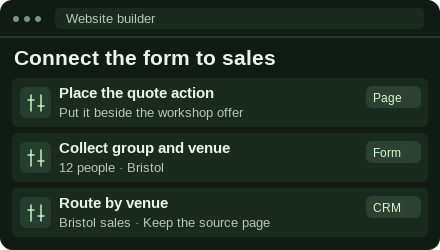
Put the quote action beside the offer. Collect group size and venue. Route the request by venue and record its source page.
Visitor journeyWithout the redesignWith the redesign
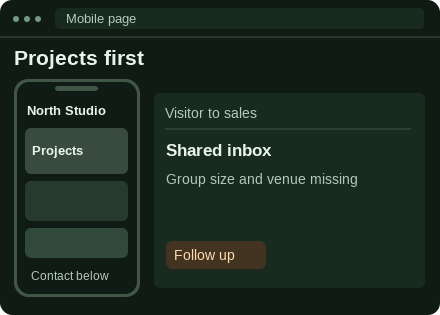
Open the workshop pageProjects first · Contact below the first screenWorkshop offer and quote action together
Request a quoteGeneric contact form12 people · Bristol venue
Sales receives the requestShared inbox · Ask for missing informationBristol sales · Group size, venue and source page recorded

Try another case: the CRM is temporarily unavailable

Visitor journeyWithout a delivery checkWith a delivery check
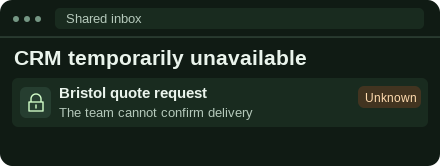
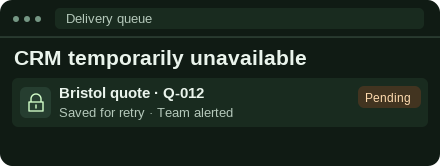
Bristol quote requestThe team cannot confirm deliverySaved · CRM delivery pending

The team receives an alert. The queued request keeps one ID for retry. This option requires secure server storage in the agreed scope.

1. What comes in
Mobile visit: A visitor wants a quote; Workshop quote. 12 people at the Bristol venue. Mobile
2. What the system checks
Website builder: Connect the form to sales; Place the quote action. Put it beside the workshop offer. Page; Collect group and venue. 12 people · Bristol. Form; Route by venue. Bristol sales · Keep the source page. CRM

3. See the result in the tool

Without the redesign
Mobile page: Projects first; Shared inbox. Group size and venue missing. Follow up
With the redesign
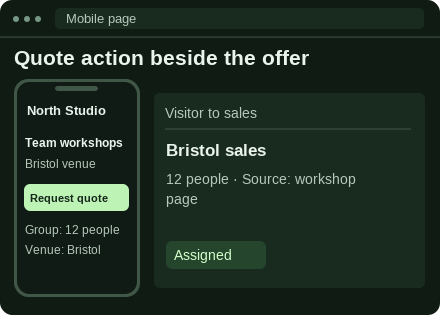
Mobile page: Quote action beside the offer; Bristol sales. 12 people · Source: workshop page. Assigned

The visitor finds the quote action. Bristol sales receives group size, venue and the source page.

Try another case: the CRM is temporarily unavailable
Without a delivery check
Shared inbox: CRM temporarily unavailable; Bristol quote request. The team cannot confirm delivery. Unknown
With a delivery check
Delivery queue: CRM temporarily unavailable; Bristol quote · Q-012. Saved for retry · Team alerted. Pending

The team receives an alert. The queued request keeps one ID for retry. This option requires secure server storage in the agreed scope.

See how we would deliver this

How we would build it for you

We build
One mobile page, its quote form and the agreed delivery to your CRM.
You provide
The offer, required fields and the person who owns each type of enquiry.
We verify together
A test enquiry reaches the right desk. The team can trace its delivery.
Show us the page you want to improve
More examples

Website redesign

Mobile comparison

Current design
North StudioWorkshop bookingsProjects
Library · Garden
Ask about a workshop
Proposed design
North StudioWorkshop bookingsAsk about a workshopProjects
Library · Garden

On a narrow screen, the project list pushes the contact action down. Put the action beside the service summary and keep the project list below it.

See the test for website redesign

Test at 320 px. Find the contact action before the project list with no sideways scrolling.

CMS editing

Page editor

  • Live headingStudio classesPublished
  • Draft headingWorkshop bookingsDraft preview
  • Required heading emptyKeep the published page livePublish blocked

An editor can save and preview a draft. The live page keeps its published heading while the draft is open.

See the test for cms editing

Target: publish a heading edit in 2 minutes. Check that saving a draft makes zero live edits.

CRM form routing

Enquiry queue

  • WEB-017 · Website redesignWeb projects · Website formAssigned
  • WEB-018 · CMS editingWeb projects · Website formAssigned
  • WEB-019 · Topic missingGeneral queue · Website formManual routing

The form passes the topic and source to the CRM. An enquiry with a missing topic goes to the general queue.

See the test for crm form routing

Send three fictional enquiries. Expect one manual route, one queue per enquiry and the form source on all three.

Ways to work with us

We offer project-based, full-time, part-time and hourly options. We confirm what fits the scope of your work and our team’s availability.

One conversation

Tell us what your site should do

Share the page you want to start with and the action a visitor needs to take. A link to your current site can help.

Talk to Synaptum

Discuss your website

Start with your name and email. The form prepares a draft for you to review and send in your email app.

info@synaptumdigital.com
Project details

Delivery, cost factors, ownership, support and FAQs.

Scope & deliverables

What we can build with you

Choose the first job your team or your customers need to finish.

Business websites

Give visitors a clear route from your offer to an enquiry or booking. Start with the first page they need and its next action.

Website redesigns

Work out which pages to keep, combine or redirect. Review one page template with your content before applying it across the site.

Editable content and forms

Set up a content management system if your team needs one. Test a page edit and a form submission with the people who will handle them.

Illustrative example

Where does a form enquiry go?

Sample form: Alex at a fictional business selects “Request a quote” and enters alex@example.com.

Inbox only

One message in a shared inbox

The form emails the inbox. The sales team must spot the message, copy it into the CRM and assign someone to reply.

Form connected to the CRM

One record with an owner

The form uses the email to find or create a contact. The quote option assigns the sales owner, and the CRM records the page it came from.

Show confirmation when the site accepts the enquiry. If the CRM connection fails, keep the enquiry available and alert the agreed owner.

Fictional data. This example represents a possible design. It uses no live tools or client records.

Integrations & data

Connect the site to your tools

Connect forms, bookings or your CRM as needed. Agree which fields you need, where they go and who can read them. Check consent before adding analytics that need it. Agree what the site does if a connection fails.

Explore workflow automation

How we work

Agree what done looks like

We agree the first milestone and how your team will check it before we build.

  1. Pick the key journey

    Agree what the visitor needs to find and do. Identify which content, redirects and integrations the first release needs.

  2. Review with real content

    Try the page on a phone and with a keyboard. Test a content edit with your team and use Lighthouse to check site speed.

  3. Test before launch

    Send a sample enquiry in the test site. Check its owner and confirmation. Test the failure path and review the launch checklist together.

What shapes the cost?

The cost depends on the page templates, content, editing features, integrations and migration. We agree who supplies copy and images before we price the work. Agree the first release and timing. Price hosting, licences and maintenance separately.

Ownership & support

Own the site and control the data

You own the custom work we build for your site and keep control of the domain and your data. Handover covers the source code, account access and editing instructions. Third-party platforms, fonts and plugins keep their own licences.

Before work starts, agree who looks after updates, backups and broken forms. Set a schedule and scope if you want us to maintain the site.

Engineering & operations

Meet your project team

Work directly with a small studio. We confirm the people and responsibilities for each project before work starts.

Miguel Ángel Rasero

Miguel Ángel Rasero

AI & software engineering

Scopes the site and its connections. Plans the checks for launch and handover.

Miriam Alonso

Miriam Alonso

Automation & process improvement

Maps the enquiry from the visitor to its owner. Checks that staff can edit pages and handle enquiries.

UX and design partners plan how people use the service. Frontend partners build the interface. DevOps partners help with deployment and monitoring. Marketing partners help with enquiries and follow-up. AI engineers help test features that need AI. We confirm which partners will take part for each project.

Before we start

Web development FAQs

When is a template enough?

Use a template if it supports your pages, editing needs and contact form. A custom build makes sense when those needs exceed the platform’s limits.

Can you redesign our existing site?

Yes. We check which content and URLs to keep, what needs a redirect and which tools must work after launch.

Can our team edit the site?

Yes, if editing is in scope. We agree who can edit which content, then ask your team to make a test edit before handover.

What if we need a portal or web application?

If users need accounts, permissions or business rules, we can scope the first workflow as a software project.

Explore custom software development

Talk to Synaptum

Tell us where you need a hand.

Loading the enquiry form…

Use the contact sectionEmail us directly